
Finance teams know which recurring tasks need a better way of working: explaining the gap between budget and actuals, collecting spending requests, or assembling the next board pack. The challenge is turning that knowledge into something the team can use, without making another spreadsheet do everything.
Datarails Studio brings natural-language, no-code building to that problem. Datarails presents it as a way to turn a plain-language brief into a finance analysis, dashboard, app or workflow. The starting point is not code: it is the finance task, the data behind it and the view or process you want to create.
Based on official Studio materials reviewed November 12, 2026, not hands-on testing. Solving Finance may earn compensation from partner links. Partner disclosure · Official Studio source.
What you can build
Studio’s showcase includes finance templates for budgeting, 13-week cash forecasting, variance analysis, board reporting, AR aging and reconciliations. Here are four concrete ways to frame a project, drawing on those templates and the product’s workflow positioning. They are examples to explore, not projects we have executed.
Turn budget and actuals into a variance view
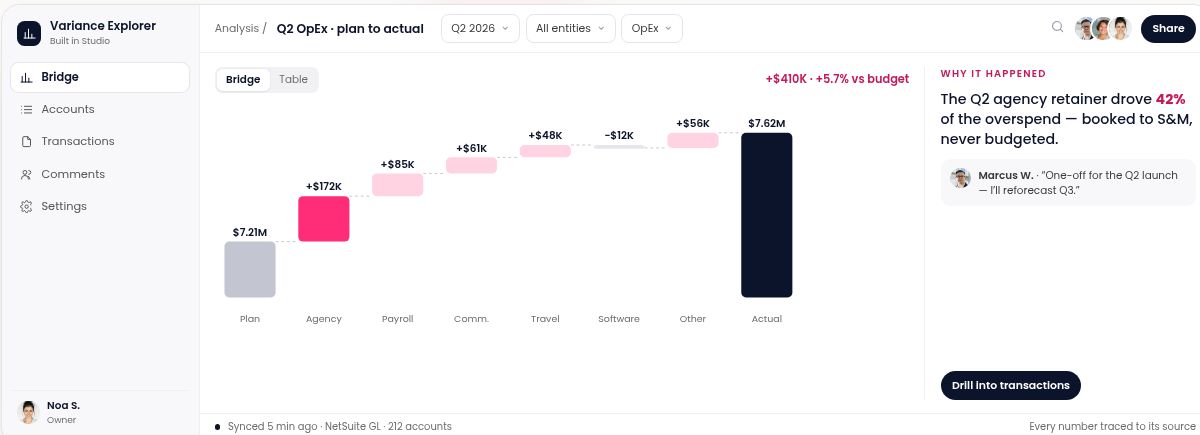
Start with: budget and actuals spreadsheets for a period or department. Build toward: a view of the bridge from plan to actual, with the drivers of the difference and an explanation alongside it. Finance value: put the numbers and the variance story together for a reporting discussion. The Variance Explorer showcase pictured above illustrates that direction with demo data.
Give budget requests a shared workflow
Start with: the request fields, decision rules and approvers your team uses today. Build toward: a request form, an approval queue and a finance summary by department, period and status. Finance value: bring scattered submissions into a process people can follow, instead of reconstructing the status from emails. The starter brief below makes this idea concrete.
Create a board-reporting starting point
Start with: reporting files and the measures your board pack needs to cover. Build toward: a board-reporting view based on Studio’s template, adapted to your reporting structure. Finance value: give recurring preparation a consistent starting point, with room for finance’s analysis and commentary.
Frame a 13-week cash forecast
Start with: opening cash, expected receipts, payments and forecast assumptions. Build toward: a weekly cash view using the 13-week forecast template as a starting point. Finance value: organize the inputs and assumptions around the liquidity questions the team needs to discuss.
Explore Studio’s finance templates
Why the finance context matters
For FP&A teams, controllers and finance leaders, a useful app needs more than an attractive screen: its numbers must relate to the models and processes already in use. Studio is positioned to work alongside Excel, rather than requiring teams to abandon their existing models. The official page also describes attaching Excel, CSV and PDF files.
Datarails pairs that finance focus with vendor-described permissions, approvals, version history, audit trails and source traceability. The appeal is connected numbers and governed collaboration: a finance team can describe both what a view should show and how a workflow should operate. How those controls and data connections fit your organization belongs in the product conversation, rather than being assumed from a showcase.
From an idea to a budget request app
A strong brief describes the work, not just the screen. For budget requests, name the fields a department submits, who makes each decision and what finance needs to see. Where budget and actuals are connected, the department’s budget position can be part of the requested context.
- Collect the department, requester, amount, currency, period and business justification.
- Define configurable approvers and amount thresholds, with a record of each decision.
- Specify requester, approver and finance views so each person has a clear next action.
This is our suggested starter brief, not an app we have built or tested. Adapt it to your process; it asks the builder to identify missing data and configuration rather than fill gaps with invented numbers.
Build a budget request app for our finance team.

Request form fields:
- Department (dropdown)
- Requester (name and email of the submitting user)
- Amount (number, required, greater than 0)
- Currency (dropdown, default to our reporting currency)
- Period (month or quarter the spend falls in)
- Business justification (long text, required)
- Status (Draft, Submitted, Under review, Approved, Rejected — set by the workflow, not editable by the requester)

Approval workflow:
- Make approver roles configurable (for example: department head, FP&A reviewer, CFO) with an amount threshold for each step.
- Route each submitted request to the next approver, record who approved or rejected it and when, and require a comment on rejection.
- Notify the requester when the status changes.

Budget context:
- Where our budget and actuals data is already connected, show the department's budget, actuals to date and remaining budget for the selected period next to each request.
- If that data is not connected, show a clear "budget data not connected" message instead of estimating numbers.

Views:
- "My requests" for requesters, an approval queue for approvers, and a summary table for finance with filters by department, period and status.

Before finishing, list any assumptions you made and anything I need to configure (roles, permissions, data connections).
What to confirm for your team
Bring these practical questions to Datarails when exploring a fit:
- Data and refresh: which files or systems your project can use, how they connect and how often they update.
- Roles and approvals: who can build, view, edit and approve, and how the workflow matches your team’s responsibilities.
- Access and plan: what the available trial or plan includes for your users and proposed project.
- Output review: reconcile calculations to source data and review workflow rules with the people who will use them.
Bring one recurring finance task to Studio
Choose a task your team already understands: a monthly variance discussion, a budget request process or a recurring board report. Bring a clear brief, the inputs it needs and the decisions it should support. That gives you a concrete basis for exploring Studio’s templates and discussing what a useful version would look like for your team.
Your next finance app starts with a clear brief.
Explore the official showcase and find a starting point for your recurring task.
Explore StudioRelated reading on Solving Finance: Reporting & Automation, AI for Finance.