A practical guide to this topic
Reporting automation improves how financial data is gathered, reconciled, summarized and presented. The aim is a repeatable reporting process with clear ownership and traceable numbers, rather than another report template that someone must populate by hand.
For controllers, reporting analysts and teams improving the handoffs around a recurring close.
A useful starting point is the path from source systems to the report. Identify exports, copied values, workbook versions and reconciliation steps. The archive’s Excel-connected FP&A article distinguishes this assembly work from the modeling work analysts want to retain. A connected workflow must still make it possible to explain where a number came from.
Month-end close adds a coordination problem: several people collect, check and approve information before reporting begins. Automation opportunities include recurring templates, data collection and checklist handoffs. Exceptions should remain visible, with an owner who can investigate them. A dashboard is useful only when the underlying data and refresh timing support the question being asked.
Follow the learning path from close and data flow to variance reporting and common-size analysis. It suits teams planning process improvements as well as analysts preparing their next management discussion. Budgeting and forecasting connects reported results to future assumptions; Excel and modeling covers the mechanics of preparing and analyzing data.
Tasks to explore
- Map a source-to-report handoff
- Track close responsibilities
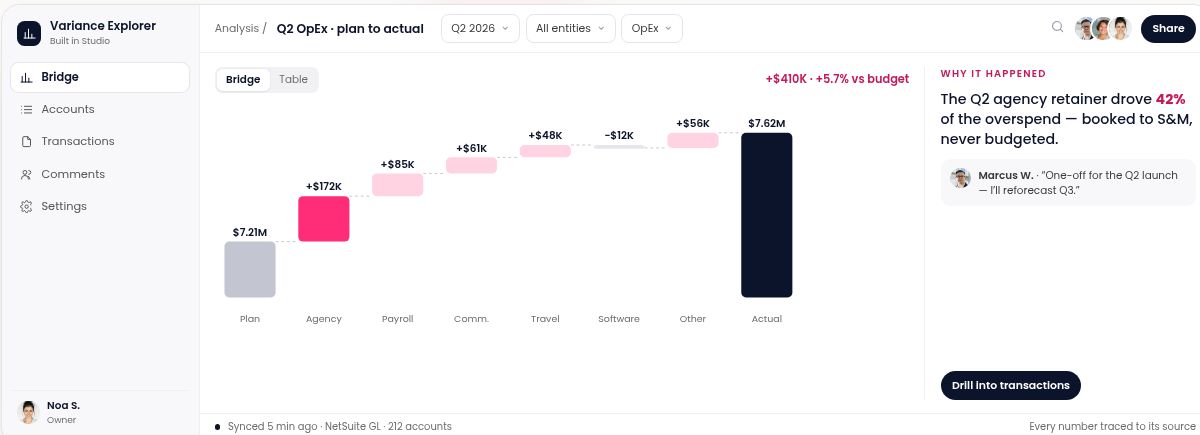
- Prepare budget-versus-actual commentary
- Explain balance-sheet composition
A learning path
- How to Improve Month End Close Using Financial Automation?
- Getting Real FP&A Automation While Staying in Excel
- The Guide to Creating a Variance Analysis Report in Excel
- Vertical Analysis in the Balance Sheet
Common questions
Is automation only about calculations?
No. Data collection, version management and coordination can be as important as formulas.
What makes a variance report useful?
Aligned inputs, an understandable presentation and discussion of the reasons behind the difference.
Does a refreshed dashboard mean the close is complete?
No. Refreshing data and completing reconciliations or approvals are different steps.
Connect this topic with Budgeting & Forecasting and Excel & Modeling. See the Knowledge directory and glossary for more reading routes.